Typst table styles: a copy-paste gallery
Typst table styling is driven by four arguments — stroke for the lines, fill for cell backgrounds (it can be a function of the column and row index), align, and inset for padding — plus show table.cell.where(…) rules for a specific row, column, or cell.
Each block below is complete. See the main Typst tables guide for columns, merged cells, and repeating headers.
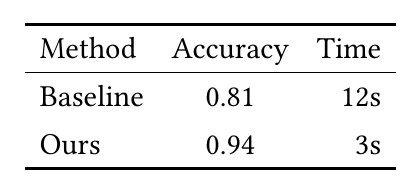
Booktabs — three rules, no verticals
The publication default. No vertical lines, no double rules.
#table(
  columns: 3,
  stroke: none,
  align: (left, center, right),
  table.hline(stroke: 1pt),
  table.header[Method][Accuracy][Time],
  table.hline(stroke: 0.5pt),
  [Baseline], [0.81], [12s],
  [Ours],     [0.94], [3s],
  table.hline(stroke: 1pt),
)
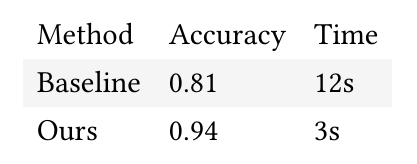
Zebra striping
fill is called for every cell with its column and row index, so any striping rule is a one-liner.
#table(
  columns: 3,
  stroke: none,
  fill: (x, y) => if calc.odd(y) { luma(245) },
  table.header[Method][Accuracy][Time],
  [Baseline], [0.81], [12s],
  [Ours],     [0.94], [3s],
)
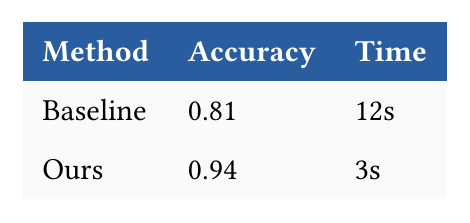
Coloured header row
#show table.cell.where(y: 0): set text(fill: white, weight: "bold")

#table(
  columns: 3,
  stroke: none,
  fill: (x, y) => if y == 0 { rgb("#2a5d9f") } else { luma(250) },
  inset: 7pt,
  table.header[Method][Accuracy][Time],
  [Baseline], [0.81], [12s],
  [Ours],     [0.94], [3s],
)
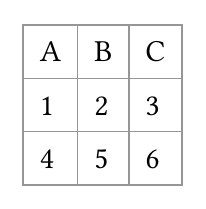
Full grid
The default when you leave stroke alone; set it to control weight and colour.
#table(
  columns: 3,
  stroke: 0.5pt + luma(150),
  inset: 6pt,
  table.header[A][B][C],
  [1], [2], [3],
  [4], [5], [6],
)
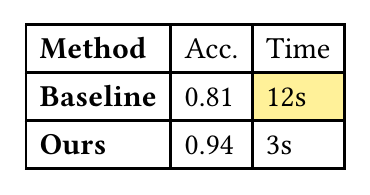
Emphasising one column or one cell
#show table.cell.where(x: 0): strong

#table(
  columns: 3,
  [Method], [Acc.], [Time],
  [Baseline], [0.81], table.cell(fill: yellow.lighten(60%))[12s],
  [Ours],     [0.94], [3s],
)
Every argument used here is documented in the Typst table reference.
In KL studiopaste any block above into a draft and the preview renders it as you type, so comparing two styles is a matter of editing one line.
Common questions
- How do I get the booktabs look in a Typst table?
- Set stroke: none on the table and add table.hline() at the top, under the header, and at the bottom. That reproduces the three-rule layout booktabs gives you in LaTeX, which is what most journals expect.
- How do I colour alternate rows in a Typst table?
- Pass a function to fill: fill: (x, y) => if calc.odd(y) { luma(240) }. Typst calls it for every cell with the column and row index, so returning a colour for odd rows gives zebra striping.
- How do I colour the header row of a Typst table?
- Use a fill function that keys on the row index, fill: (x, y) => if y == 0 { luma(230) }, or add #show table.cell.where(y: 0): set text(weight: "bold") to style the header text.
- How do I style one specific cell in a Typst table?
- Wrap it in table.cell and pass the styling arguments directly, for example table.cell(fill: yellow, align: center)[42]. A show rule on table.cell.where(x: .., y: ..) does the same for a position.