How to format tables in LaTeX
Build a table in LaTeX with the tabular environment: declare a column spec (l left, c centre, r right), separate cells with &, and end each row with \\. For publication-quality rules, load booktabs and use \toprule, \midrule, and \bottomrule instead of \hline.
\begin{tabular}{l c r}
  Method   & Acc.  & Time \\
  Baseline & 0.81  & 12s  \\
  Ours     & 0.94  & 3s   \\
\end{tabular}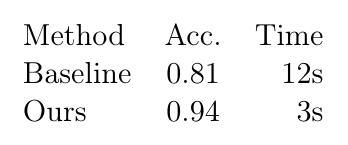
A complete document you can paste
\documentclass{article}
\usepackage{booktabs}

\begin{document}

\begin{table}[t]
  \centering
  \begin{tabular}{lcr}
    \toprule
    Method   & Accuracy & Time \\
    \midrule
    Baseline & 0.81     & 12s  \\
    Ours     & 0.94     & 3s   \\
    \bottomrule
  \end{tabular}
  \caption{Accuracy and runtime.}
  \label{tab:results}
\end{table}

As Table~\ref{tab:results} shows, the method is faster and more accurate.

\end{document}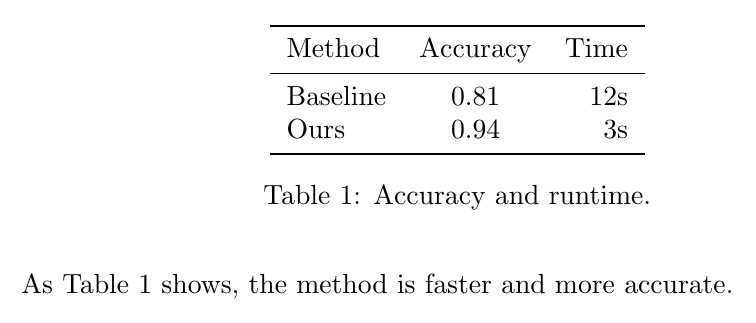
Clean, publication-quality rules
Avoid vertical lines and double rules. booktabs gives you \toprule, \midrule, and \bottomrule — the convention almost every journal expects — with the right thickness and spacing built in.
Spanning cells
\multicolumn spans columns and can override the alignment for that cell; multirow adds \multirow for spanning rows.
\usepackage{booktabs}
\usepackage{multirow}
% ...
\begin{tabular}{lcc}
  \toprule
  & \multicolumn{2}{c}{Scores} \\
  \cmidrule(lr){2-3}
  Method & Dev & Test \\
  \midrule
  \multirow{2}{*}{Ours} & 0.92 & 0.94 \\
                        & 0.91 & 0.93 \\
  \bottomrule
\end{tabular}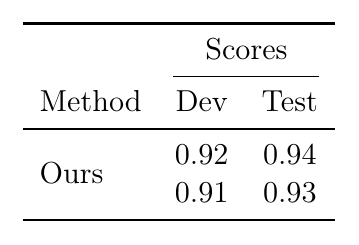
Tables that fit the page
tabularx takes a target width and an X column that absorbs whatever is left, so a wide table wraps instead of running into the margin.
\usepackage{tabularx}
% ...
\begin{tabularx}{\linewidth}{lX}
  Term & Description that can be long and will wrap neatly \\
\end{tabularx}
Floating tables & captions
Wrap the tabular in a table float to add a caption and make it referenceable: \caption{…} then \label{tab:results}, cited with \ref{tab:results}.
Writing in Typst instead? Tables in Typst covers the equivalent, and the style gallery has copy-paste variants.
Common questions
- What is the difference between toprule, midrule and bottomrule?
- They are the three horizontal rules booktabs provides: toprule above the header, midrule between the header and the body, and bottomrule at the end. They are thicker or thinner than a plain hline and add vertical padding, which is why journal tables look cleaner with them.
- How do I remove the vertical lines from a LaTeX table?
- Leave them out of the column specification: write {lcr} rather than {|l|c|r|}. Professional typesetting convention is no vertical rules at all, and booktabs is designed around that.
- How do I merge cells in a LaTeX table?
- Use \multicolumn{n}{c}{text} to span n columns, and \multirow{n}{*}{text} from the multirow package to span n rows. A multicolumn also lets you override the alignment for that one cell.
- How do I make a table fit the page width in LaTeX?
- Use tabularx with a total width and an X column, which absorbs the remaining space, or wrap the tabular in \resizebox from graphicx. tabularx is preferable because it keeps the font size consistent with the body text.
- Why is my LaTeX table not where I put it?
- A tabular inside a table float is placed by LaTeX where it fits, and [h] is only a hint. To force the position, use [H] from the float package, or leave the tabular outside a float entirely.