How to format tables in Typst
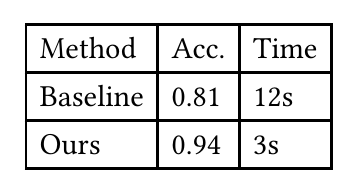
Make a table in Typst with the #table function: set columns to the number of columns (or a list of widths), then list the cells in reading order. Use table.header for a repeating header, table.cell(colspan: n) to merge cells, and stroke: none to remove the lines.
Typst fills the grid row by row, so you write cells in the order you read them — there is no & separator and no row terminator.
#table(
  columns: 3,
  table.header[Method][Acc.][Time],
  [Baseline], [0.81], [12s],
  [Ours],     [0.94], [3s],
)
A complete document you can paste
Everything below is a working file — save it as main.typ and compile.
#set page(paper: "a4", margin: 2.5cm)
#set text(size: 11pt)

= Results

#figure(
  table(
    columns: (auto, 1fr, 1fr),
    stroke: none,
    align: (left, center, center),
    table.hline(),
    table.header[Method][Accuracy][Time],
    table.hline(stroke: 0.5pt),
    [Baseline], [0.81], [12s],
    [Ours],     [0.94], [3s],
    table.hline(),
  ),
  caption: [Accuracy and runtime.],
) <tab:results>

As @tab:results shows, the method is both faster and more accurate.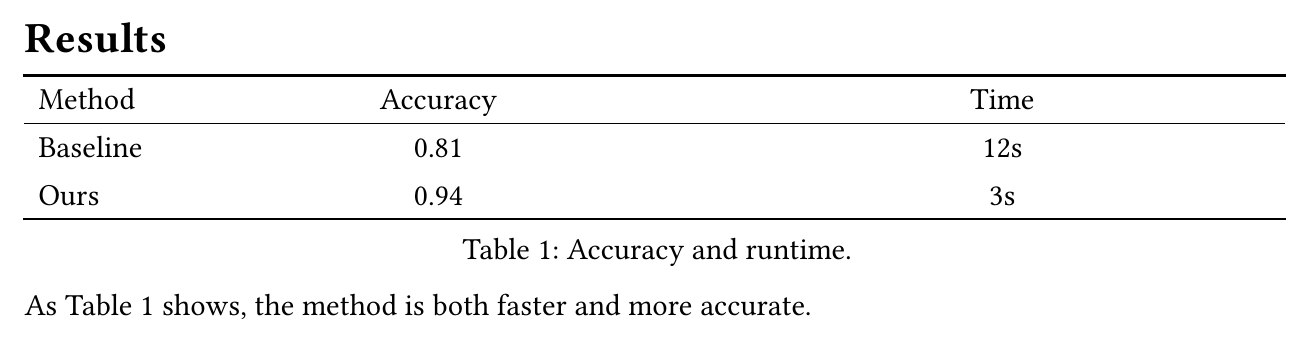
Column widths and alignment
columns takes a count or a list of track sizes: auto fits the content, 1fr takes a share of the remaining space, and a length like 3cm is fixed. align takes one value for the whole table or one per column.
#table(
  columns: (auto, 1fr, 3cm),
  align: (left, center, right),
  [Name], [Description], [Value],
)

Merging cells
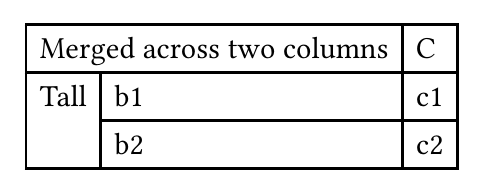
table.cell with colspan or rowspan merges cells. You do not leave gaps for the covered area — Typst flows the following cells around it.
#table(
  columns: 3,
  table.cell(colspan: 2)[Merged across two columns], [C],
  table.cell(rowspan: 2)[Tall], [b1], [c1],
  [b2], [c2],
)
Styling a single column
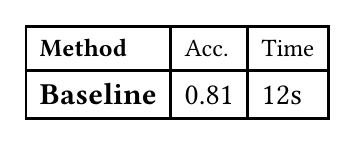
A show rule targeting a cell position styles a whole column at once — x is the zero-based column index, y the row.
#show table.cell.where(x: 0): strong
#show table.cell.where(y: 0): set text(size: 9pt)

#table(
  columns: 3,
  [Method], [Acc.], [Time],
  [Baseline], [0.81], [12s],
)
Rules, padding, and text size
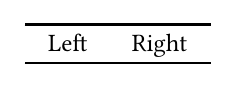
stroke: none removes every line; add table.hline() for the horizontal-rules-only look journals expect. inset sets the padding inside cells, and a #set text rule around the table changes its type size.
#[
  #set text(size: 9pt)
  #table(
    columns: 2,
    stroke: none,
    inset: (x: 8pt, y: 4pt),
    table.hline(),
    [Left], [Right],
    table.hline(),
  )
]
The full argument list is in the Typst table reference.
columns, align, or a show rule, so you see the layout change immediately instead of waiting on a full rebuild.Common questions
- How do I merge columns in a Typst table?
- Wrap the cell in table.cell(colspan: n)[...] to span n columns, or table.cell(rowspan: n)[...] to span rows. Typst lays the remaining cells out around it, so you do not add placeholder cells for the space it covers.
- How do I make one column bold in a Typst table?
- Pass a function to the table's align or use a show rule, but the simplest way is to set the whole column with table.cell: give the cells you want bold a strong[...] body, or add #show table.cell.where(x: 1): strong to make column index 1 bold everywhere in that table.
- How do I remove the lines from a Typst table?
- Set stroke: none on the table. To keep only horizontal rules (the booktabs look), leave stroke: none and add table.hline() where you want a line.
- How do I decrease the text size in a Typst table?
- Wrap the table in a block that sets the text size: #[#set text(size: 9pt); #table(...)]. The set rule applies to everything inside, including the header.
- How do I repeat the header on every page of a long Typst table?
- Put the header cells in table.header(...). Typst repeats it automatically when the table breaks across pages; pass repeat: false to turn that off.
- How do I set the row height in a Typst table?
- Use the rows argument: table(columns: 3, rows: 2em, ...) sets every row, and rows: (auto, 3em) sets them individually. inset controls the padding inside each cell.