How to add citations and a bibliography in LaTeX
Keep your references in a .bib file, cite them by key with \cite{key}, and let the toolchain build the list. The modern stack is biblatex with the biber backend and \printbibliography. Compile pdflatex → biber → pdflatex → pdflatex — most citation problems are simply that sequence not having run.
\usepackage[backend=biber]{biblatex}
\addbibresource{references.bib}
% ...
Transformers \cite{vaswani2017} changed everything.
% ...
\printbibliography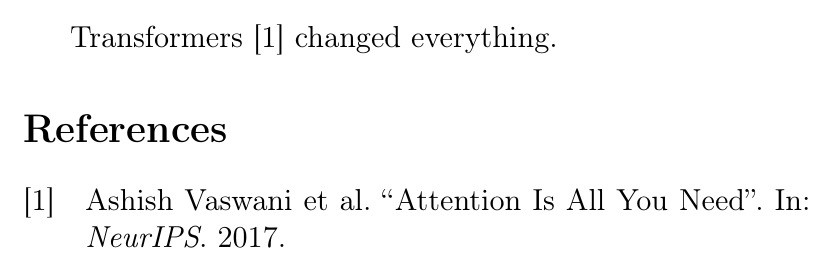
A complete document you can paste
\documentclass{article}
\usepackage[backend=biber,style=numeric]{biblatex}
\addbibresource{references.bib}

\begin{document}

Attention-based models \cite{vaswani2017} replaced recurrence.

\printbibliography

\end{document}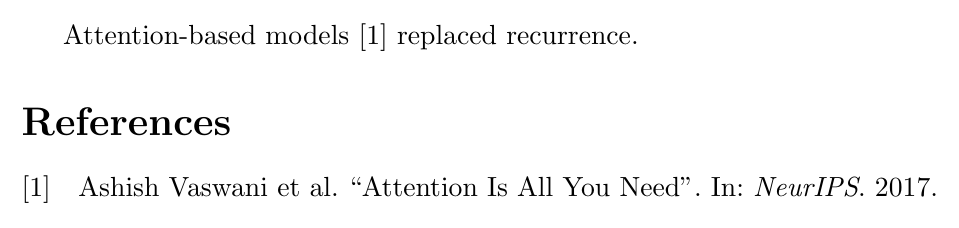
% references.bib
@inproceedings{vaswani2017,
  title     = {Attention Is All You Need},
  author    = {Vaswani, Ashish and others},
  booktitle = {NeurIPS},
  year      = {2017},
}
The compile order
This is the single most common source of trouble. The first pdflatex pass writes an .aux file listing which keys you cited; biber reads that and produces the formatted entries; the next two passes insert them and settle the numbering. Skip a step and you get question marks.
biblatex or classic BibTeX
biblatex is the modern choice — Unicode-safe, far more configurable, and clearer about errors. Classic BibTeX with natbib is still everywhere in journal templates, and uses a different set of commands:
% classic BibTeX + natbib
\usepackage{natbib}
\bibliographystyle{plainnat}
% ...
\citep{vaswani2017}   % [Vaswani et al., 2017]
\citet{vaswani2017}   % Vaswani et al. [2017]
% ...
\bibliography{references}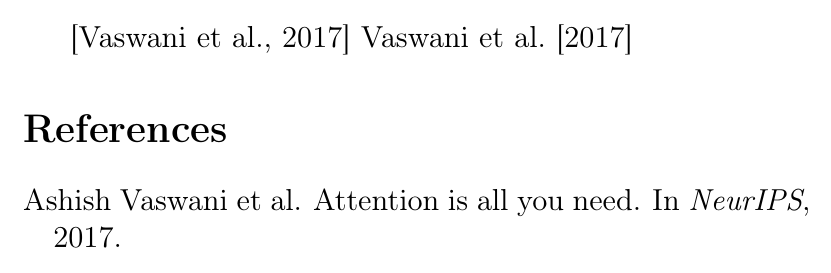
Common errors, and the fix
Citation undefined — the bibliography step did not run; recompile through the full sequence. Empty bibliography — nothing matched your keys, or with classic BibTeX nothing was cited; \nocite{*} prints everything in the file. Mixing backends — passing backend=bibtex while running biber (or the reverse) fails confusingly. biber version mismatch — update the whole TeX distribution, since biblatex and biber ship as a pair.
Related: managing references for a paper and bibliographies in Typst.
\cite{slug} and pull a checked quote with \quote[slug]{}. Put the cursor on a \cite and press Cmd-Enter to jump to its source — no separate .bib bookkeeping, and the build order is handled for you.Common questions
- Why does my LaTeX citation show as a question mark?
- The bibliography step has not run, or has not run since you added the citation. Compile in the order pdflatex, biber (or bibtex), pdflatex, pdflatex — the first pass records which keys are cited, the bibliography tool resolves them, and the later passes fill the numbers in.
- Why is my LaTeX bibliography empty?
- Usually nothing was cited, or the keys do not match the .bib file exactly. With classic BibTeX a bibliography is printed only for cited entries; add \nocite{*} to include everything in the file.
- Should I use biblatex or BibTeX?
- Use biblatex with the biber backend for new documents: it handles Unicode, gives far more control over styles, and has clearer error messages. Stay with classic BibTeX only when a journal's template requires it.
- What is the difference between \citep and \citet?
- They come from natbib and author-year styles. \citep gives a parenthetical citation, (Vaswani et al., 2017), and \citet gives a textual one, Vaswani et al. (2017), where the authors are part of the sentence.
- How do I fix a biber version mismatch?
- The error means your biber binary and the biblatex package are from different releases. Update the whole TeX distribution rather than either one alone, since biblatex and biber are versioned together.