How to write equations and math in Typst
Math goes between $…$ in Typst. Whitespace decides the form: $x^2$ stays inline, while $ x^2 $ — with spaces inside the dollars — becomes a centred block. Turn on numbering with #set math.equation(numbering: "(1)"), and align multi-line math on &.
Multi-letter names are read as functions or symbols, so write x y for a product and spell pi, alpha, and sum by name.
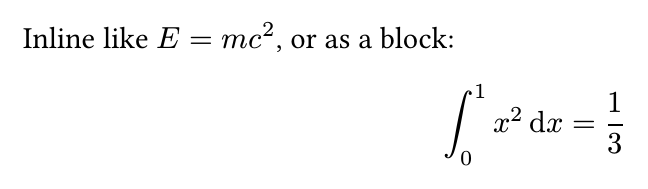
Inline like $E = m c^2$, or as a block:
$ integral_0^1 x^2 dif x = 1/3 $
A complete document you can paste
#set page(paper: "a4", margin: 2.5cm)
#set math.equation(numbering: "(1)")

= Method

The loss is the mean squared error over the batch:

$ cal(L) = 1/N sum_(i=1)^N (y_i - hat(y)_i)^2 $ <eq:loss>

Expanding the square gives

$ (x+1)^2 &= (x+1)(x+1) \
          &= x^2 + 2x + 1 $ <eq:expand>

By @eq:loss and @eq:expand, the gradient is straightforward.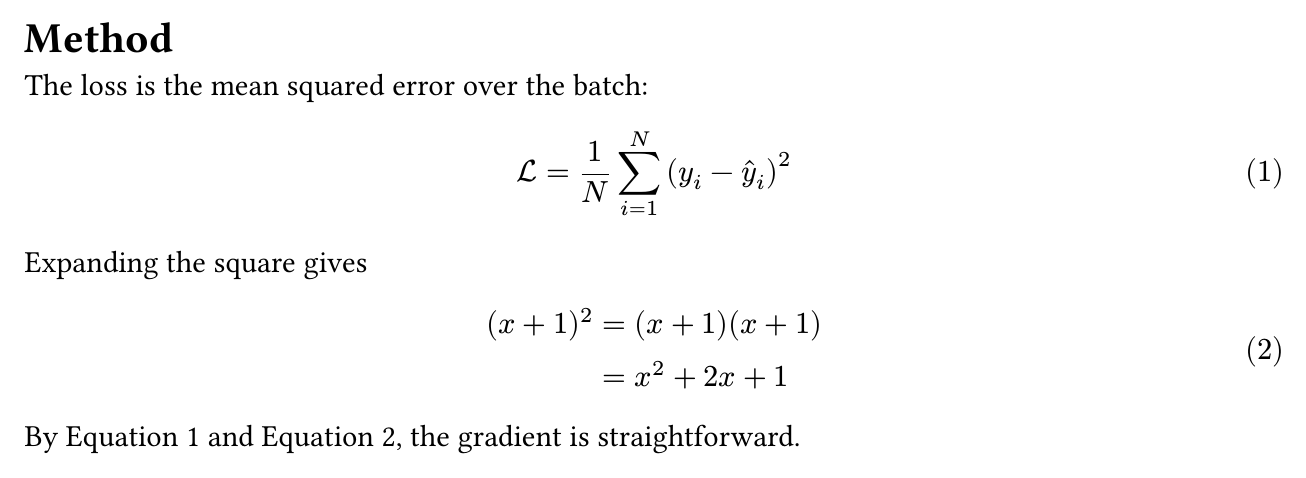
Numbering and references
One set rule numbers every block equation. Attach a label with <eq:f> after the closing $, and reference it with @eq:f. To leave a single equation unnumbered, scope a rule around it.
#set math.equation(numbering: "(1)")

$ a^2 + b^2 = c^2 $ <eq:pyth>

#[
  #set math.equation(numbering: none)
  $ "this one has no number" $
]

See @eq:pyth.

Alignment
Inside one block equation, & marks the alignment point and a single \ ends a line. Everything lines up on the & column.
$ f(x) &= (x+1)^2 \
       &= x^2 + 2x + 1 \
       &>= 0 $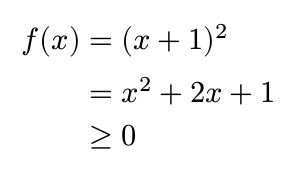
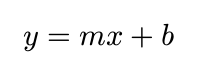
Block equations are centred by default. To left-align them, set the alignment — for one equation with a scope, or for the whole document with a show rule.
#show math.equation: set align(left)

$ y = m x + b $
Upright names, operators, and text
A single letter is italic because it reads as a variable. op("…") makes it an operator name — upright, with operator spacing — and upright(…) changes only the style. Quoted text inside math is set upright automatically.
$ op("l")(x) = upright(d) x quad "for all" x in RR $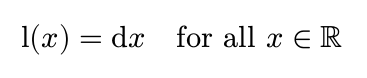
The full symbol list and function reference are in the Typst math documentation. Looking for a quick reference table instead? See Typst math and science symbols.
& or unmatched $ is caught right there instead of in a wall of compiler output.Common questions
- How do I number equations in Typst?
- Add a set rule: #set math.equation(numbering: "(1)"). Every block equation is then numbered. Suppress the number for one equation with #set math.equation(numbering: none) inside a scope, or by making it inline.
- How do I label and reference an equation in Typst?
- Attach a label after the closing dollar with angle brackets, $ ... $ <eq:f>, and reference it with @eq:f. Numbering must be switched on for the reference to render a number.
- How do I align equations in Typst?
- Put & at the alignment point on each line and separate lines with a single backslash, inside one block equation. Every line then lines up on the & column.
- How do I left-align an equation in Typst?
- Block equations are centred by default. Wrap the equation in #set align(left) for a scope, or use #show math.equation: set align(left) to left-align every block equation in the document.
- How do I make a letter upright as an operator in Typst?
- Use op("l") to typeset it as an operator name in upright type with operator spacing, or upright(l) for upright type alone. Single letters are italic by default because they read as variables.
- How do I strike out part of an equation in Typst?
- Use #strike for a plain strikethrough, or the cancel function from a package for the diagonal cancellation bar used when simplifying an expression.