How to write equations and math in LaTeX
Inline math goes between $…$ and a centred display equation goes in \[ … \]. For numbered, referenceable equations and multi-line alignment, load amsmath and use the equation and align environments. Avoid $ — it is plain TeX and spaces badly.
Inline like $E = mc^2$, or displayed:
\[ \int_0^1 x^2 \, dx = \tfrac{1}{3} \]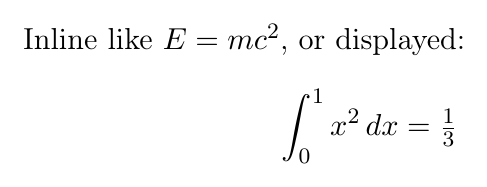
A complete document you can paste
\documentclass{article}
\usepackage{amsmath}
\usepackage{amssymb}

\begin{document}

The loss is the mean squared error over the batch:
\begin{equation}
  \mathcal{L} = \frac{1}{N} \sum_{i=1}^{N} (y_i - \hat{y}_i)^2
  \label{eq:loss}
\end{equation}

Expanding the square gives
\begin{align}
  (x+1)^2 &= (x+1)(x+1) \label{eq:expand} \\
          &= x^2 + 2x + 1 \nonumber
\end{align}

By \eqref{eq:loss} and \eqref{eq:expand}, the gradient follows.

\end{document}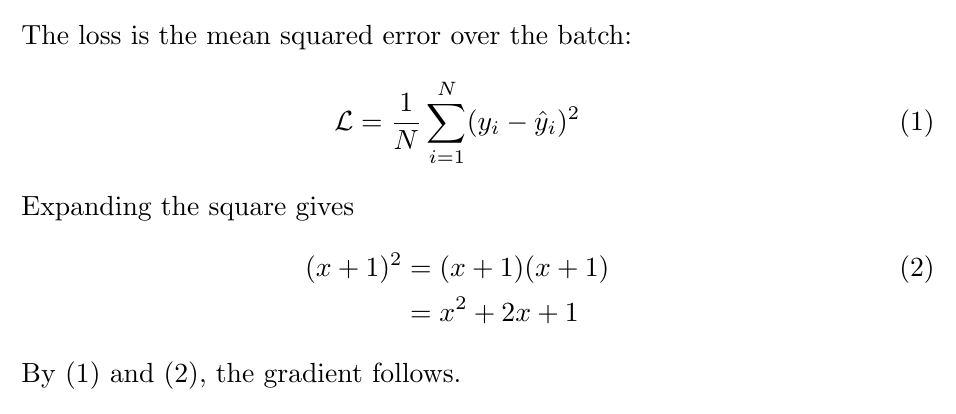
Numbered & aligned
Use align for several equations lined up on the &. Add \label and reference with \eqref; suppress a number on a line with \nonumber, or use align* to number none of them.
amssymb adds the extra symbol set, and mathtools extends amsmath with fixes and extras such as \coloneqq and better matrix environments.
Writing in Typst instead? See equations and math in Typst. Looking for a symbol? See LaTeX math and science symbols.
In KL studiosyntax errors in a math block surface inline in the diagnostics panel as you type, so a stray
& or unmatched brace is caught at the line it is on rather than buried in a wall of compiler log output.Common questions
- What is the difference between equation and align in LaTeX?
- equation typesets a single numbered formula. align handles several lines at once and lines them up on the & character, giving each line its own number unless you suppress it with \nonumber.
- How do I write an unnumbered equation in LaTeX?
- Use the starred form, \begin{equation*} or \begin{align*}, or add \nonumber to the individual line you want unnumbered. Both need the amsmath package.
- How do I reference an equation in LaTeX?
- Put \label{eq:name} inside the equation and cite it with \eqref{eq:name}, which adds the parentheses for you. Plain \ref gives the number without them.
- Should I use $ for display math in LaTeX?
- No. $ is plain TeX and gives inconsistent spacing in LaTeX documents. Use \[ ... \] for an unnumbered display, or the equation environment when you need a number.